
App Guide: Power Search
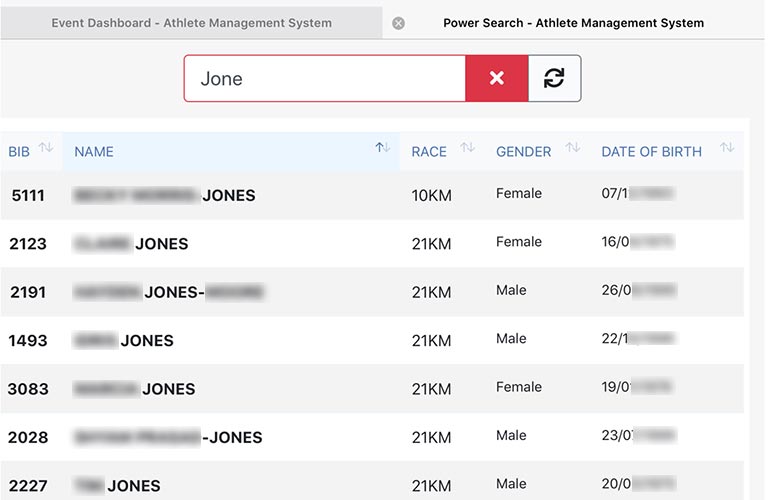
Power Search is a standalone, single-page Director App that provides a fast and easy way to search the entire registration list for a single event and identify entrants – and their race number – very quickly. It does not require login to access it, which means it is an ideal way to give registration helpers at the event venue a secure way to quickly look up entrant’s race numbers.
Power Search is intended to replace the traditional paper-based “Entrant List” which has long been used at event registration to find the someone’s race number if the entrant either does not have a record of their number, or you prefer that your staff identify the number themselves instead of trusting the information given by the entrant. Flicking through multi-page paper lists is very slow and inefficient and can lead to queue’s forming and a poor experience for entrants.
How Is It Accessed?
Power Search is accessed through a single URL per event. The URL has the event access key embedded into it, meaning that it can be emailed to anyone you want to be able to access the search, but they do not need to be authorised users of Director. This is handy as volunteers/helpers at the registration venue can be given access without allowing them to see the rest of your Director data.
You can find the Power Search URL on Event Dashboard. Go to the Actions button and select Power Search. There is also an option here to launch Power Search directly.
How Does It Work?
Power Search makes use of Javascript, a widely used web browser technology that is at the heart of all modern web applications. When the page first loads, Power Search downloads the entire event entrant database to the local browser. From there, all search and sort functionality is processed directly in the web browser, guaranteeing virtually instantaneous response times.
There are only two small downsides to the way Power Search works; 1. because the entire event database has to be downloaded first, it can take a few seconds for the initial page load, and 2. because the database has been cached locally within the browser, any new registrations that may arrive will not be reflected in this data. To cater for this, a “Refresh/Resync” button is available should there be a perceived need to get more up-to-date data.
Power Search has been used on an event database with in excess of 30,000 entrants and it performed quickly and flawlessly.
Can You Switch It Off?
Power Search cannot be disabled. However, if you have concerns that the secret URL may have fallen into the wrong hands – or you just want to disable access post-race for those who were helping at your registration – you can re-generate your Event Access Key on Event Dashboard. Remember, though, that your event access key may be being used for other Director Apps so be sure to consider how you may be using those as changing the event key may also affect them.